
A small file-serving service of mine slowed to a crawl one afternoon after a
“harmless” middleware change. CPU on the server box doubled, throughput
roughly halved. The diff was a single line: instead of handing a *os.File
to io.Copy, somebody had wrapped it in a tiny logging reader to count
bytes.
That one wrap quietly turned off sendfile(2).
This post is about that fast path: what Go does for you for free, how to see it actually fire, and the surprisingly easy ways to lose it.
The setup
- Linux 6.6 / Ubuntu 24.04 (WSL2), AMD Ryzen 5 9600X, 16 GiB RAM
- Go 1.22.12
- 512 MiB random-bytes file, page cache warm
Every benchmark below serves the same big.bin file over plain TCP to a Go
client on the same machine. Server pinned to CPU 0, client to CPU 1, so we
can read /usr/bin/time server-side and compare apples to apples. Syscall
counts come from a vanilla strace -c -e trace=read,write,sendfile,splice.
What sendfile actually does
A normal “send this file” looks like this:
disk -> page cache -> read() into user buffer -> write() into socket buffer -> NIC
                          ^ copy 1                 ^ copy 2
sendfile(2) collapses those two copies into one in-kernel transfer:
disk -> page cache --(sendfile)--> socket buffer -> NIC
                       ^ no userspace round trip
No read, no write, no 32 KiB buffer bouncing through your address space.
The kernel just splices page-cache pages straight into the socket’s send
queue. For socket-to-socket forwarding the equivalent is splice(2), which
moves bytes through a kernel pipe without ever materialising them in user
memory.
You dont call either of these directly in Go. The standard library does it for you, when it can.
The fast path
The Go runtime gives *net.TCPConn a ReadFrom method. When you write
io.Copy(conn, f)
io.Copy checks whether the destination implements io.ReaderFrom. A
*net.TCPConn does, so the call gets dispatched to its ReadFrom. That
method’s first job is to look at the source: is it a *os.File? Is it an
*io.LimitedReader wrapping a *os.File? If yes, it calls into
internal/poll.SendFile, which loops over sendfile(2) until the file is
drained.
The whole detection chain lives in two files:
net/sendfile_linux.go and os/zero_copy_linux.go. It is roughly:
// (simplified, in net/sendfile_linux.go)
lr, ok := r.(*io.LimitedReader)
if ok { remain, r = lr.N, lr.R }
f, ok := r.(*os.File)
if !ok { return 0, nil, false } // fall back
// ... sendfile loop ...
Two type assertions and a syscall loop.
Three handlers, one file
Here are the three reader shapes I want to compare. All three serve the
same 512 MiB file over plain TCP. The only difference is what gets passed
to io.Copy.
// raw: hand io.Copy a *os.File directly.
_, _ = io.Copy(conn, f)

// wrapped: hide *os.File behind a "just an io.Reader" struct.
type justReader struct{ r io.Reader }
func (j justReader) Read(p []byte) (int, error) { return j.r.Read(p) }
_, _ = io.Copy(conn, justReader{r: f})

// limit: wrap in *io.LimitedReader, the only wrapper the runtime sniffs.
_, _ = io.Copy(conn, io.LimitReader(f, fileSize))
A justReader does nothing. It’s the minimal example of a piece of
middleware that “just wants to count bytes” or “just wants to inject a
tracing span” or any other innocent reason to slip an io.Reader in front
of the file. As far as the type system is concerned, the value is now an
io.Reader, full stop. The runtime’s type switch on *os.File fails and
the optimization is gone.
io.LimitReader looks just as wrappy, but the runtime explicitly checks
for *io.LimitedReader before giving up, unwraps it, and keeps going. So
it preserves the fast path.
Watching it with strace
Run each handler under strace -c -e trace=read,write,sendfile,splice,
fire five 512 MiB transfers, and look at the summary.
raw (io.Copy(conn, f)):
% time     seconds  usecs/call     calls    errors syscall
------ ----------- ----------- --------- --------- ----------------
 99.79    0.231981          78      2958       860 sendfile
  0.15    0.000359          51         7         1 write
  0.05    0.000126          18         7           read
------ ----------- ----------- --------- --------- ----------------
100.00    0.232466          78      2972       861 total
2,958 sendfile calls, 7 reads, 7 writes. The reads and writes
are accept/setup chatter, not file data. The 860 “errors” are EAGAIN
returns where the socket buffer was full and the runtime poller bounced
back, which is normal under sendfile.
wrapped (io.Copy(conn, justReader{f})):
% time     seconds  usecs/call     calls    errors syscall
------ ----------- ----------- --------- --------- ----------------
 56.67    3.202339          48     65546         3 write
 43.33    2.448353          37     65547           read
------ ----------- ----------- --------- --------- ----------------
100.00    5.650692          43    131093         3 total
Zero sendfile. ~131 thousand combined read and write syscalls, all
of them 32 KiB chunks bouncing the data through a userspace buffer. That
32 KiB number is the default in io.copyBuffer. The wall time spent in
syscalls is roughly 24x the fast path.
A CPU profile of the wrapped handler under load makes the call chain obvious:
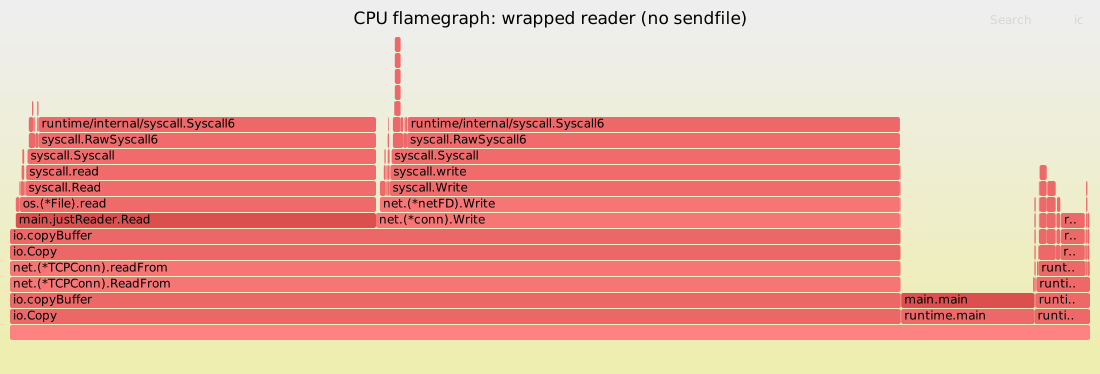
Of 1,670 CPU samples collected during the run, 1,362 (~82%) are inside
syscalls: 761 in syscall.Write writing to the socket, 522 in
syscall.Read pulling the next 32 KiB out of the file. The frame
sequence at the top of every hot stack is io.Copy -> io.copyBuffer -> (*TCPConn).ReadFrom -> readFrom -> io.Copy -> io.copyBuffer -> ....
That nested io.copyBuffer is the signature: *TCPConn.readFrom
couldn’t find a *os.File to hand to sendfile, so it threw the work
back to io.copyBuffer, which is now doing the bounce by hand. The
flamegraph shows where every cycle of that bounce went.
limit (io.Copy(conn, io.LimitReader(f, n))):
% time     seconds  usecs/call     calls    errors syscall
------ ----------- ----------- --------- --------- ----------------
 99.84    0.239191          82      2896       893 sendfile
  0.14    0.000330          47         7         1 write
  0.02    0.000047           6         7           read
Indistinguishable from raw. 2,896 sendfiles. The LimitReader wrap is
free, because the runtime knows about that one specific type.
What this costs
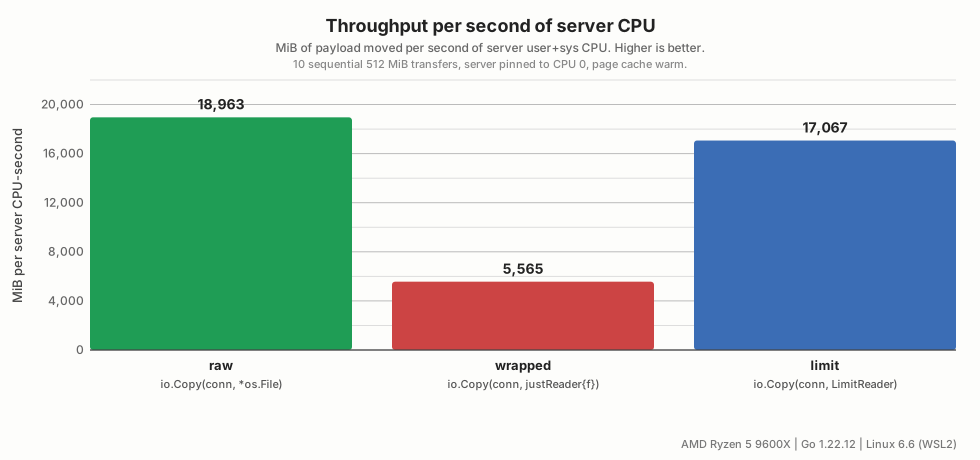
Loopback throughput is a misleading number: the receiver and the TCP buffers absorb a lot, so the wall clock looks similar across all three modes (1.5 - 1.7 GiB/s per request). A more honest measure is the server’s own CPU time to ship the file:
| mode | server user+sys CPU (10 x 512 MiB) | per-GiB CPU |
|---|---|---|
| raw | 0.27 s | ~54 ms |
| wrapped | 0.92 s | ~184 ms |
| limit | 0.30 s | ~60 ms |
The wrapped path costs roughly 3.4x the CPU per byte. On localhost
that gets absorbed; on a real network or under concurrent load it pegs a
core and tanks tail latency. 2,972 syscalls vs 131,093 syscalls to move
the same 2.5 GiB is the cost of saying “I just want an io.Reader”.
The same data viewed the other way around, as MiB of payload shipped per second of server CPU consumed, makes the gap stand out:
splice for socket-to-socket
sendfile is file-to-socket. The symmetric case is socket-to-socket,
which is what a proxy does all day. There the runtime uses
splice(2) instead. A 30-line TCP proxy:
ln, _ := net.Listen("tcp", ":9100")
for {
    c, _ := ln.Accept()
    go func(client net.Conn) {
        defer client.Close()
        server, _ := net.Dial("tcp", upstream)
        defer server.Close()
        go io.Copy(server, client)
        io.Copy(client, server)
    }(c)
}
Two io.Copy calls, both between *net.TCPConns. Strace one transfer
through the proxy and watch:
% time     seconds  usecs/call     calls    errors syscall
------ ----------- ----------- --------- --------- ----------------
 99.98    0.754999          70     10677       481 splice
  0.01    0.000109          13         8           read
  0.01    0.000065          65         1           write
10,677 splice calls. Zero read or write on the data path. The proxy
never touches the bytes. (*TCPConn).readFrom looks at the source, sees
another *TCPConn, and dispatches to spliceFrom. The same fragility
rule applies: wrap either side in your own io.Reader or io.Writer
and you fall back to the 32 KiB bounce.
Rules of thumb
A few things I took away from the file server that started this whole thing:
Don’t wrap if you can avoid it. Every layer of io.Reader between
the file and the connection is a chance to type-assert your way out of
the fast path. The runtime only recognises *os.File,
*io.LimitedReader, and a handful of *net.TCPConn-shaped types.
Anything else is opaque.
If you must wrap, preserve the optional interfaces. A wrapper that
implements io.WriterTo (when wrapping a source) or io.ReaderFrom
(when wrapping a destination) and forwards through can keep io.Copy
dispatching all the way down. It is slightly fiddly to get right, but
the stdlib does it routinely.
io.LimitReader is free, anything else isn’t. For ranged responses
this is the wrap to reach for. It’s exactly how http.ServeContent
keeps sendfile active for Range requests.
Trust strace -c, not your intuition. Two sendfile counts and zero
writes mean you’re on the fast path. Hundreds of thousands of
read+write pairs mean you’re not. There is no middle ground.
Don’t assume sendfile is always reachable. A surprise I’ll save for
another post: even the textbook io.Copy(w, f) against an
http.ResponseWriter can route around sendfile for reasons that have
nothing to do with your code. The principle is the same, but the trigger
is hiding in the framework, not the handler.
sendfile and splice are old, boring kernel APIs that you almost
never have to reach for in Go. The runtime mostly does it for you, for
free. The trick is knowing what to leave alone for that to keep being
true. When strace shows read/write spam where you expected zero-copy,
the cause is almost always an innocent wrapper somebody added for the
best of reasons.
And when even sendfile isn’t enough, when you want the file mapped into your address space so the kernel never has to copy it out at all, you go user-space. But that’s a different story.